Lead CatcherNew
Murphy sniffs out leads on your website. Each one lands in your Contacts.
Add a Get in touch button to your website. A dog owner fills in a short form, and Murphy catches the lead with what they asked about.
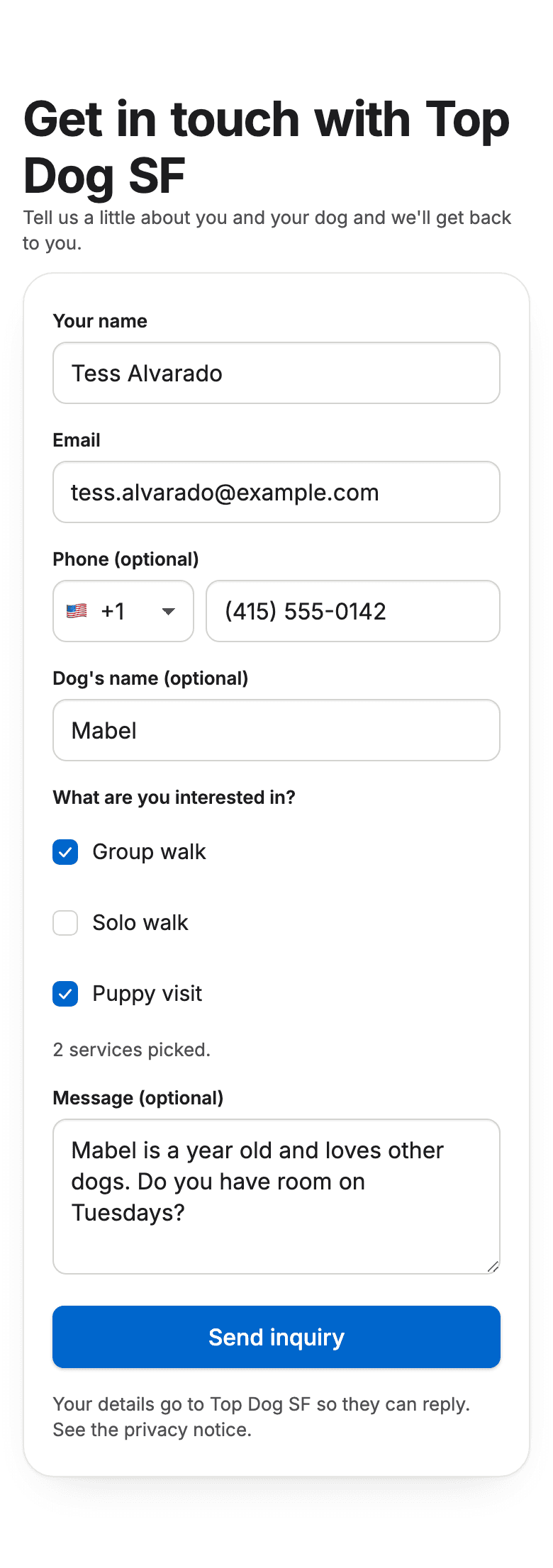

The real form, with example data.
From website visitor to client.
Sniff: A dog owner fills in the Get in touch form on your website, and Murphy picks it up.
The form asks for their name, email, phone, dog's name, the services they want, and a message. It has its own link, so you can put it behind a button on your website or in your Instagram bio.
Catch: The lead lands in your Contacts, marked General inquiry or with the services they picked.
The form lists your own services, so a lead reads Group walk or Puppy visit, not a guess. If the person is already in your Contacts, Murphy adds the inquiry to them instead of making a second record.
Fetch: Send your registration form in one tap. They become a client when they finish it.
Their name and email are filled in for them. They add their dogs, vet, and emergency contact, sign your waiver, and land in Clients. A lead never turns into a client on its own.
What you can count on.
- Built to stop bots
- A hidden trap field, a limit on how often one address can send, and a bot check stop most spam before it reaches your Contacts.
- Leads stay leads
- Nothing reaches your client list until the person finishes your registration form. You choose who gets one.
- Your name, your services
- The form carries your business name and lists your services. Visitors never need a Murphy account.
- Off until you switch it on
- Lead Catcher stays off until you turn it on in settings, and you can turn it off again at any time.
Included in every plan.
Lead Catcher comes with Murphy at no extra cost. Start with two months free, no card.